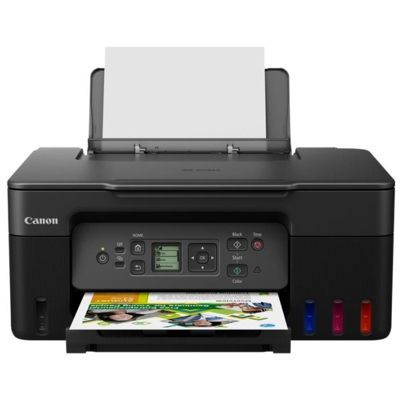
Description Canon G3470 inkjet printer �� Deep Dive: Canon PIXMA G3470 Inkjet Printer �� ENGINEERING & BUILD QUALITY The Canon G3470 is part of Canon’s G-Series MegaTank lineup. It’s designed with a refillable ink tank system instead of traditional ink cartridges — giving it a significant cost-per-page advantage and making it ideal for long-term, high-volume printing. Build: Sturdy plastic chassis with a clean, functional layout. Top-mounted flatbed scanner with soft-close lid. Design Choice: Compact by MegaTank standards, but larger than cartridge-based printers due to visible ink tanks and refill reservoirs. ��️ PRINT TECHNOLOGY & PERFORMANCE Print Head Type: Canon’s FINE (Full-photolithography Inkjet Nozzle Engineering) print head, known for high-precision droplet placement. Ink Droplet Size: As small as 2 picoliters, which enhances image clarity and smooth color gradients. Print Speed Details: Black text: ~11 images per minute (ipm) — fast for an ink tank model. Color: ~6 ipm, which is slower but consistent with other models in its class. Photo Printing: Borderless 4×6-inch (10×15 cm) photo in ≈45 seconds. Supports borderless printing up to A4 size. Works best with Canon photo paper (e.g., GP-501, PP-201). �� INK SYSTEM: GI-41 Bottles The G3470 uses GI‑41 ink bottles — Canon’s proprietary refill system with spill-proof, color-coded nozzles that prevent incorrect filling. Color GI-41 Code Page Yield (Standard Mode) Black GI-41BK ~6,000 pages (up to 7,600 in Economy mode) Cyan GI-41C ~7,700 pages (up to 8,100 in Economy mode) Magenta GI-41M Same as above Yellow GI-41Y Same as above �� Economy Mode reduces ink usage but slightly lowers print density. Ideal for drafts or internal documents. �� Waste Ink Absorber: Replaceable maintenance cartridge (MC-G04) helps keep the printer functional long-term without sending it in for service. �� SMART CONNECTIVITY Wi-Fi (2.4 GHz only) — No dual-band Wi-Fi 5/6 support, but stable for basic printing. USB 2.0 – Classic Type-B connector for wired setups. Mobile Printing: Canon PRINT app: Print from phone or tablet (iOS/Android). Apple AirPrint & Mopria: No driver needed for wireless printing on supported OSes. PIXMA Cloud Link: Enables cloud print (Google Drive, Dropbox, etc.). Voice Assistant Integration: Supports printing via Alexa or Google Assistant for simple commands (e.g., “Print my calendar”). �� SCANNER & COPIER Flatbed Type: CIS (Contact Image Sensor) – fast and energy-efficient. Resolution: 600 × 1200 dpi – sufficient for documents and basic photo scanning. Max Document Size: A4 / Letter. Copy Functions: Standard, borderless, ID copy, fit-to-page. No ADF (automatic document feeder), so manual placement is needed for multi-page scans. �� MAINTENANCE TIPS & CONCERNS Regular Use Is Critical: All inkjets are prone to nozzle drying if left unused for weeks. Print a test page or nozzle check weekly. Cleaning Modes: Normal, deep cleaning, and system flush available via printer menu or Canon software. Ink Monitoring: Transparent ink tanks on-screen indicators prevent accidental dry printing. Firmware Updates: Canon periodically releases updates that may improve print stability or app compatibility. �� WHO SHOULD BUY THE G3470? ���� Ideal for: Home offices & students who print regularly and want to minimize ink costs. Teachers & freelancers needing to print hundreds of pages monthly (e.g., worksheets, invoices, reports). Photo hobbyists who want casual photo printing without high ink costs. Micro-businesses like shops, cafes, or home-based services producing flyers, menus, or labels. �� Not ideal for: Infrequent users (better suited to laser or thermal printers). Heavy-duty scanning tasks (no ADF). Fast-paced offices needing automatic duplexing or Ethernet. �� Real-World User Feedback (Summary from Forums & Reviews) ⭐ “Prints are crisp, and ink seems to last forever.” �� “Maintenance cartridge replacement is easy but costs extra.” ⚠️ “No automatic double-sided printing is a letdown.” ��️ “Surprisingly good photo quality, especially with glossy paper.” �� What’s in the Box Canon PIXMA G3470 printer Full set of GI-41 inks (BK, C, M, Y) Power cord Setup CD (drivers/utilities) – also available online User manual and quick start guide.